Key takeaways
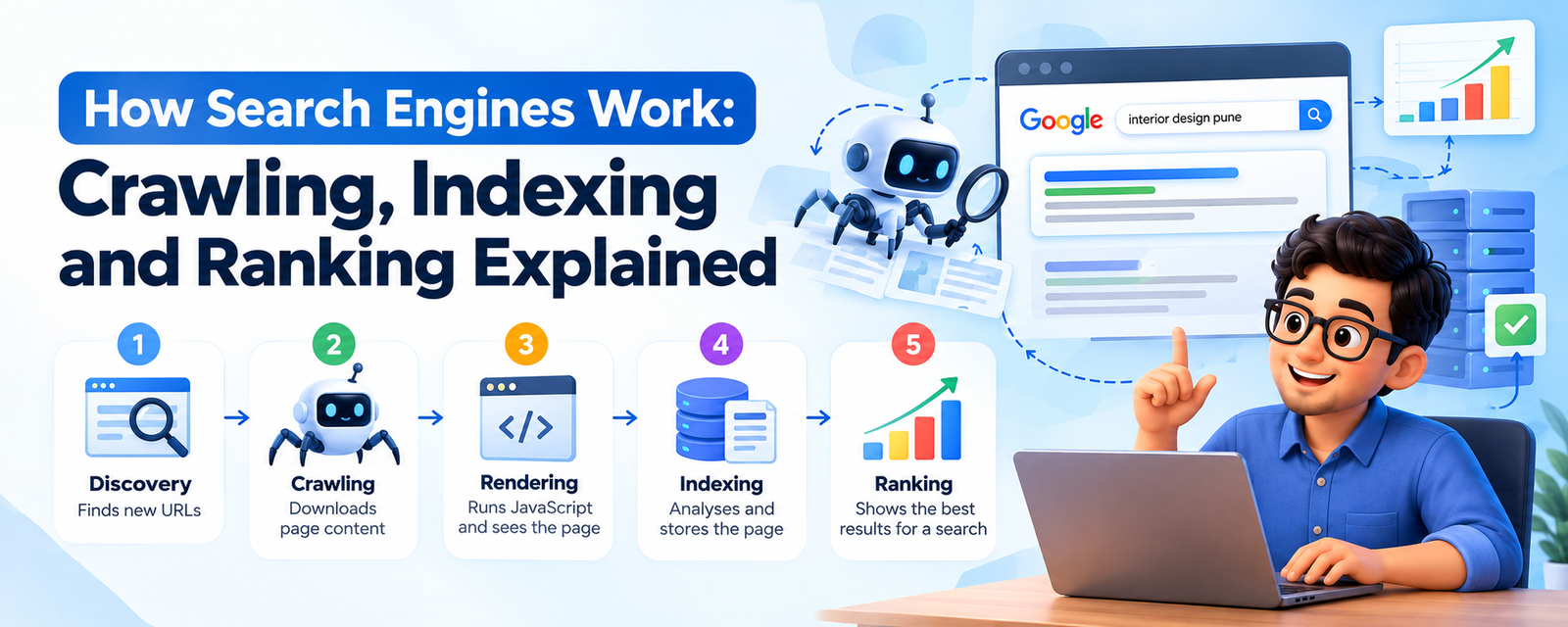
- A search engine does five jobs in order: it discovers URLs, crawls them, renders them, indexes them and finally ranks them for a search.
- A page that fails an early stage never reaches the later ones. Most "why am I not ranking?" problems are really "why isn't Google crawling or indexing this?" problems.
- Ranking is decided at the moment someone searches, using hundreds of signals: meaning, relevance, quality, usability and context such as location.
- AI answers in Google, ChatGPT, Perplexity and others still depend on the same foundation: pages that can be found, read and trusted.
Every time you type a question into Google, you get an answer in well under a second. It feels like magic. It isn't. Behind that half-second is a very large, very patient system that has been reading the web for years before you ever asked.
If you run a website, understanding that system is the single most useful piece of SEO knowledge you can have. Not because you need to know how Google's data centres are wired, but because almost every SEO decision you make comes back to one question: does this help a search engine find, understand and trust my page?
This guide walks through what actually happens, stage by stage, and what you can do at each stage. If you're completely new to the subject, start with our overview of what SEO is, then come back here.
What is a search engine, really?
A search engine is a system that builds a copy of the public web, organises it, and then answers questions by picking the most useful pages from that copy. The important word is copy. When you search, Google isn't looking at the live internet. It's looking at its index, the version of the web it has already collected and processed.
That has a very practical consequence. If a page isn't in the index, it cannot appear in results, no matter how good it is. And if the version in the index is out of date, searchers see the old version until Google visits again.
Most major search engines, including Google and Bing, work on the same broad model. Google's own documentation describes three stages: crawling, indexing and serving results. We break it into five below because each one is a separate place where things can go wrong.
| Stage | What happens | What usually breaks it |
|---|---|---|
| 1. Discovery | The search engine learns that a URL exists | No internal links, no sitemap, orphan pages |
| 2. Crawling | A bot downloads the page | Robots.txt blocks, server errors, very slow responses |
| 3. Rendering | The bot runs JavaScript and sees the page like a browser | Content that only appears after failing or delayed scripts |
| 4. Indexing | The page is analysed and stored | noindex tags, duplicates, thin or low-value content |
| 5. Ranking | Indexed pages are ordered for a specific search | Weaker relevance, quality or trust than competing pages |
Stage 1: Discovery — how search engines find new pages
Before a search engine can do anything with your page, it has to know the URL exists. There's no central registry of web pages, so search engines find URLs the same way you'd find a new restaurant: someone points you to it.
The main ways Google discovers URLs are:
- Links from pages it already knows. When Googlebot crawls a page, it pulls out every link and adds new URLs to its list. This is why internal linking matters so much.
- XML sitemaps. A sitemap is a file listing the URLs you want search engines to know about. You can submit it in Google Search Console and Bing Webmaster Tools. Our XML sitemap guide shows how.
- Links from other websites. A backlink from another site is also a discovery route, which is one reason new sites with no links get discovered slowly.
A real-world example. Say a Pune-based interior design studio publishes 30 project pages but only links to them from a filterable gallery built in JavaScript, with no plain HTML links and no sitemap. Google may find the home page and the gallery, but it can easily miss most of the individual project pages. They exist, they look great, and they get zero search traffic, simply because nothing points to them in a way a crawler can follow. Adding a sitemap and plain text links from category pages usually fixes it within weeks.
Pages with no internal links pointing to them are called orphan pages. They are one of the most common silent problems we find in audits.
Stage 2: Crawling — how bots read your site
Once a URL is on the list, a crawler visits it. A crawler (also called a bot or spider) is an automated program that requests pages, like a browser does, and downloads what the server sends back.
Google's main crawler is Googlebot, and today it crawls primarily as a smartphone. Bing has Bingbot. AI companies run their own crawlers too, such as OpenAI's crawlers for ChatGPT and PerplexityBot for Perplexity.
Three things decide how smoothly crawling goes:
Your robots.txt file
Before crawling, well-behaved bots check yourdomain.com/robots.txt. This file tells them which parts of the site they may and may not request. A single wrong line, such as a Disallow: / left over from a staging site, can block your whole site. We've seen this happen on live business sites more times than we'd like. Our robots.txt guide covers the rules and common mistakes.
Server health and speed
Googlebot adjusts how fast it crawls based on how your server responds. If your pages return errors (5xx codes) or respond slowly, Google backs off to avoid overloading you. That's polite, but it also means fewer of your pages get crawled and updates take longer to show in search.
Crawl demand and crawl budget
Google doesn't crawl every page on every site every day. It decides how often to come back based on how important and how frequently updated your pages seem. For most small and medium websites, this is never a problem. For very large sites, such as e-commerce stores with hundreds of thousands of filter URLs, it becomes a real constraint. We explain when it matters in our crawl budget guide.
Stage 3: Rendering — seeing the page like a user
Many modern websites don't send finished HTML. They send a basic shell plus JavaScript, and the browser builds the page. React, Angular and Vue sites often work this way.
To see what users see, Google renders pages using a recent version of Chrome. It runs the JavaScript, waits for content to load and then looks at the result. This is powerful, but it has limits:
- Rendering takes more resources, so it can happen later than the first crawl.
- If a script fails, times out or needs a user action (like a click or scroll) to load content, Google may never see that content.
- Links that only work through JavaScript click handlers, not real
links, may not be followed.
Practical rule: anything you want to rank for, such as body text, headings, product details and internal links, should be present in the HTML the server sends, or at least load reliably without user interaction. Server-side rendering or static generation removes most of the risk.
A quick check: open Google Search Console, use the URL Inspection tool on a key page, and click "View crawled page". If your main content isn't in the rendered HTML, Google isn't seeing it either.
Stage 4: Indexing — understanding and storing the page
After rendering, Google analyses the page to understand what it's about and decides whether to store it in the index. This is where a lot of pages quietly drop out.
What Google looks at
- The main text, headings and the language it's written in
- The title tag, meta description and structured data
- Images and videos, and their alt text and captions
- Links in and out of the page
- Signals about quality, freshness, location relevance and usability
Canonicalisation: picking one version
The web is full of near-duplicates. The same product might be reachable at five URLs because of tracking parameters, sorting options or http/https versions. Google groups these together and picks one canonical URL to show in results. You can suggest which one using a canonical tag, but Google treats it as a strong hint, not an order. Our canonical tags guide explains how to get this right.
Why indexing isn't guaranteed
Google is clear that it doesn't index every page it crawls. Common reasons a page is left out:
- It carries a noindex tag (sometimes by accident, from a plugin setting).
- It's a duplicate or near-duplicate of another page.
- It adds little value: thin content, boilerplate text, auto-generated pages.
- Google simply hasn't got to it yet, especially on new sites.
In Search Console, the Page indexing report shows which pages are indexed and why others aren't. "Crawled – currently not indexed" usually points to a quality or duplication issue. "Discovered – currently not indexed" usually means Google knows the URL but hasn't crawled it yet, often a crawl priority or internal linking issue.
Stage 5: Ranking and serving — choosing what to show
Ranking happens at the moment someone searches. Google takes the query, works out what the person probably wants, pulls candidate pages from the index and orders them. Google says it uses hundreds of signals. Nobody outside Google knows the exact weights, and anyone who claims to is guessing. But the broad categories are well understood.
1. Meaning of the query
Google first tries to understand the question. Language models help it recognise that "cheap flights Delhi Goa" and "low cost air tickets from Delhi to Goa" mean the same thing, and that "apple" means different things in "apple pie recipe" and "apple support".
2. Relevance
Next, which pages actually address that need? Keywords still matter, but in the sense of topic coverage, not repetition. A page that thoroughly answers the question in natural language will beat one that repeats the phrase ten times. Matching search intent is a big part of this: if everyone searching wants a comparison, a sales page won't rank.
3. Quality and trust
Among relevant pages, Google looks for signs of expertise and trustworthiness: who wrote it, whether other reputable sites link to it, whether the information is accurate and original. This is where E-E-A-T and backlinks come in.
4. Usability
If several pages are equally good, the one that works better on mobile, loads faster and doesn't bury content under pop-ups has an edge.
5. Context
Location, language, device and search settings all shape results. Search "SEO agency" in Noida and in Bengaluru and you'll see different local results. That's why rankings are never one fixed number.
Google regularly updates these systems. Some updates are small and constant; a few each year are large "core updates" that reshuffle rankings across many sites. We track the important ones in our guide to Google algorithm updates.
The results page is more than ten blue links
Depending on the query, a results page may include an AI Overview, a map with local businesses, a featured snippet, "People also ask" questions, images, videos, shopping listings or news. Each of these features is a separate opportunity. A small business might never outrank a national publisher in the regular results but still win the map pack for its city.
How AI search engines fit in
Google now shows AI Overviews for many searches and offers AI Mode as a conversational way to search. At the same time, people ask ChatGPT, Gemini, Claude and Perplexity questions they once typed into Google.
It's tempting to think this changes everything. Under the hood, it changes less than you'd expect. When these tools answer questions about current or specific information, they generally retrieve web pages first and then write an answer based on them. Google has said there are no special extra requirements for appearing in its AI features beyond normal SEO best practices; a page needs to be indexed and eligible to show a snippet.
So the stages above still apply, with a few additions:
- Your content must be accessible to the right bots. Check that robots.txt isn't blocking crawlers you actually want to be visible to.
- Clear, extractable answers win. AI systems pull passages. A page with a direct answer under a clear heading is easier to quote than one where the answer is buried in paragraph nine.
- Reputation matters more than ever. AI tools lean on sources that are widely mentioned and trusted across the web.
We go much deeper on this in our guide to generative engine optimisation.
What this means for your website: a practical checklist
Here's how to turn all of this into action, stage by stage.
| Stage | What to check | Tool |
|---|---|---|
| Discovery | Every important page is linked from at least one other page and listed in your XML sitemap | Screaming Frog, Search Console Sitemaps report |
| Crawling | robots.txt allows important sections; server returns 200 codes quickly | robots.txt report in Search Console, Crawl Stats report |
| Rendering | Main content and links appear in rendered HTML | URL Inspection → View crawled page |
| Indexing | Important pages are indexed; no accidental noindex; duplicates have correct canonicals | Page indexing report |
| Ranking | Content matches intent, is better than what ranks now, and shows expertise | Manual SERP review, Performance report |
If you only do one thing after reading this, run the URL Inspection tool on your five most important pages. You'll learn more about how Google sees your site in ten minutes than from any theory.
Want a second pair of eyes? Our team runs a free SEO audit that checks every one of these stages and gives you a prioritised list of fixes.
Common myths about how search engines work
- "Submitting my site to Google makes it rank." Submitting a sitemap helps discovery. It does nothing for ranking.
- "Google reads meta keywords." It hasn't used the meta keywords tag for ranking for many years.
- "More pages means more traffic." Publishing lots of thin pages can hurt, because low-value pages may not be indexed and can drag down how Google sees the site.
- "Paying for Google Ads improves organic rankings." Paid and organic are separate systems. Ads don't buy organic positions. (More on this in our SEO vs PPC comparison.)
- "Once indexed, always indexed." Pages can drop out of the index if they become low quality, duplicated or unreachable.
Frequently asked questions
1. How do search engines work in simple words?
They send bots to find and read web pages, store what they learn in a giant index, and then, when you search, pick and order the most useful pages from that index in a fraction of a second.
2. What is the difference between crawling and indexing?
Crawling is when a bot downloads a page. Indexing is when the search engine analyses that page and decides to store it so it can appear in results. A page can be crawled and still not be indexed.
3. What is Googlebot?
Googlebot is the name of Google's web crawler. It visits pages, follows links and sends what it finds back to Google for processing. It mostly crawls as a smartphone user.
4. How long does it take Google to index a new page?
Anywhere from a few hours to a few weeks. Pages on established, frequently updated sites with good internal linking are usually picked up faster than pages on brand-new sites.
5. How can I check if my page is indexed?
Use the URL Inspection tool in Google Search Console. It tells you whether the URL is on Google, when it was last crawled and which canonical Google chose.
6. Can I force Google to index my page?
No. You can request indexing in Search Console, which puts the URL in a priority queue, but Google still decides whether the page is worth indexing.
7. Why is my page crawled but not indexed?
Usually because Google sees it as low value, duplicated or very similar to other pages. Improving the content, consolidating duplicates and adding internal links often helps.
8. Does Google see JavaScript content?
Yes, Google renders JavaScript, but not always immediately and not if scripts fail or need user interaction. Important content is safest in the initial HTML.
9. What is a search engine index?
It's a huge database of web pages the search engine has collected and processed, organised so that relevant pages can be found instantly for any query.
10. How many ranking factors does Google use?
Google says it uses hundreds of signals combined in many systems. Exact lists circulating online are estimates, not official data.
11. Do Bing and Google work the same way?
Broadly yes: both crawl, index and rank. Their algorithms, crawl behaviour and ranking weights differ, so rankings can vary between them.
12. What is an orphan page?
A page with no internal links pointing to it. Search engines may never find it, and even if they do, it looks unimportant.
13. Does robots.txt stop a page from being indexed?
Not reliably. Robots.txt stops crawling, but a blocked URL can still be indexed without its content if other pages link to it. Use a noindex tag to keep a page out of the index, and make sure the page isn't blocked so Google can see that tag.
14. What is a canonical URL?
It's the version of a page Google chooses to show when several URLs have the same or very similar content. You can suggest it with a rel="canonical" tag.
15. Why do rankings change from day to day?
Competitors publish and update pages, Google refines its systems, results are personalised by location and device, and fresh content is sometimes tested. Small daily movement is normal.
16. How do AI search engines like ChatGPT and Perplexity find information?
For current or specific questions, they typically search the web, read a set of relevant pages and summarise them into an answer, often citing the sources they used.
17. Do I need to do anything special to appear in Google AI Overviews?
Google says no special optimisation is needed beyond normal SEO best practice. The page must be indexed and eligible to show a snippet, and clear, trustworthy content helps.
18. Does page speed affect crawling?
Yes. A slow or error-prone server makes Googlebot crawl more cautiously, which can mean fewer pages crawled and slower updates.
19. What does "Discovered – currently not indexed" mean in Search Console?
Google knows the URL exists but hasn't crawled it yet. It often points to weak internal linking, low perceived importance or crawl capacity limits on large sites.
20. What's the fastest way to get a new website noticed by Google?
Verify it in Search Console, submit an XML sitemap, link clearly between your pages, and earn a few links from relevant, real websites. Then publish genuinely useful content consistently.
Final thoughts
Search engines are not mysterious. They are very large, very systematic readers. Help them find your pages, make those pages easy to read, and give them clear reasons to trust you. Everything else in SEO builds on that.
From here, explore the rest of this series: how to match search intent, SEO vs PPC and what Google's algorithm updates mean for you. Or go back to the complete guide to SEO.
Not sure if Google can properly crawl and index your site? Request a free SEO audit and we'll show you exactly where the gaps are.
Written by Ashwini
Technical author & editor at W3XHTML publishing guides on web development and SEO.